Freshdesk Ticketing Automation with AI Agents: A Complete Guide

Introduction
At FutureSmart AI, we've helped many clients improve their support systems with AI customer service solutions. Now, we're sharing our proven approach to creating a custom AI assistant for customer service using Freshdesk. This tutorial shows you how to build an AI customer service chatbot that delivers real results – from translating customer queries into SQL commands to generating smart responses. Having deployed similar solutions across various industries, we know exactly what works. By the end of this guide, you'll have a fully functional AI customer support agent ready to streamline your support operations.
Building on the foundational concepts covered in our previous LangGraph tutorial series, where we explored creating simple AI tools for customer service using nodes and edges, this guide takes it a step further. You'll learn how to develop an agent that seamlessly:
Translates natural language into precise SQL queries
Interacts with Freshdesk APIs to manage tickets
Taps into knowledge bases for accurate responses
Retrieves real-time order status and product details
Handles shipping and return policy inquiries
Generates context-aware responses to customer queries
Drawing from our years of implementing AI solutions, we've distilled the essentials of building a robust Freshdesk chatbot that truly delivers results. This tutorial combines real-world applications with step-by-step guidance to help you create an AI-powered chatbot capable of retrieving ticket details, executing database queries, and enhancing customer service automation.

Setting up the Environment
!pip install -U langchain langchain-chroma pypdf sentence-transformers langgraph langchain_openai langchain_community requests os
Setting up API Keys
Before diving into building your Freshdesk AI integration services, it’s crucial to set up your API keys. These keys allow your agent to interact securely with external environments and tools like Freshdesk and OpenAI GPT models. Without them, the tools cannot function effectively.
import getpass
import os

def _set_env(var: str):
    if not os.environ.get(var):
        os.environ[var] = getpass.getpass(f"{var}: ")

_set_env("FRESHDESK_API_KEY")
_set_env("OPENAI_API_KEY")
_set_env("FESHDESK_URL")
Creating the LLM Object
Here’s how to initialize the LLM using LangChain ChatOpenAI
from langchain_openai import ChatOpenAI

llm = ChatOpenAI(model_name="gpt-4o")
Summary Tool Integration
Automated customer support often requires summarizing ticket messages quickly. This tool fetches and processes data via Freshdesk APIs to generate concise summaries.
Get Ticket Message: Function that gets Ticket Data through Freshdesk API’s given
ticket_idimport requests import os FRESHDESK_API_KEY = os.getenv("FRESHDESK_API_KEY") FESHDESK_URL = os.getenv("FESHDESK_URL") def get_messages(ticket_id): url = f'https://{FESHDESK_URL}.freshdesk.com/api/v2/tickets/{ticket_id}?include=conversations' headers = { 'Content-Type': 'application/json' } auth = (FRESHDESK_API_KEY, 'X') # Replace 'X' with your actual API key response = requests.get(url, headers=headers, auth=auth) return response.json()Process Message:
 def process_messages(messages):
     subject = messages['subject']
     description = messages['description_text']
     conversation = messages['conversations']
     messages = ""
     messages += "Subject : " + subject + "\n"
     messages += "User query : \n" + description + "\n"
     for message in conversation:
         if message['incoming']:
             messages += "User Query : \n" + message['body_text'] + "\n"
         else:
             messages += "Agent Response : \n" + message['body_text'] + "\n"
     return messages
Summary Chain: This method consolidates all the input Ticket Messages into a single prompt, which the LLM then processes.
 prompt = ChatPromptTemplate.from_messages(
      [("system", """FutureSmart TechStore is committed to being the leading destination for technology enthusiasts worldwide by combining quality, value, and exceptional service. At FutureSmart TechStore, we don’t just sell products—we provide solutions that enhance your lifestyle and work environment. We aim to offer great value to our customers through a range of promotions and discounts, ensuring you get the best deals on the latest technology products.

     Our collection includes a wide range of tech products designed to meet the needs of various customers, Our collection includes a wide range of tech products such as Smart Home Solutions (intelligent lighting systems, advanced security devices), Wearable Technology (fitness trackers, smartwatches), Mobile Accessories (chargers, cases, screen protectors), and Computing Peripherals (keyboards, mice, storage devices), designed to meet the needs of various customers, from tech enthusiasts to everyday users.

     If the query is not in English, please identify the language and generate a summary of the conversation in English. The response should be generated in the same language as the query.Also mention order id and customer name if present.\\n\\n{context}. Summarize:""")]
     )

 # Instantiate chain
 chain = prompt | llm
 result = chain.invoke({"context": context})
Build a Summary Tool: Define a tool that generates ticket summary
 from langchain.tools import tool
 from pydantic import BaseModel

 class SummarizeToolSchema(BaseModel):
     ticket_id: int

 @tool(args_schema=SummarizeToolSchema)
 def summarize_tool(ticket_id: int):
     """Tool to Summarize Ticket information based on ticket_id provided
     `ticket_id`: int"""
     print("INSIDE SUMMARIZE NODE", ticket_id)
     # Invoke chain
     data = get_messages(ticket_id)
     context = process_messages(data)
     print(context)
     result = chain.invoke({"context": context})
     return f"ticket_id: {ticket_id}", f"Ticket Summary: {result.content}"
Testing the Tool
summarize_tool.invoke({"ticket_id":130})# output INSIDE SUMMARIZE NODE 130 'The customer is inquiring about the status of their order #12345, as UPS lost the package. They understood that a new package would be sent immediately, but nearly a month has passed with no update. They are asking for information on what is happening.'
Agentic RAG Tool Integration
The Retrieval-Augmented Generation (RAG) enhances your AI agent by enabling it to fetch relevant documents and deliver accurate, context-rich responses. Whether you're developing a RAG chatbot, building RAG pipelines, or exploring RAG for enterprise, this guide will walk you through the integration process step-by-step.
Why Choose RAG?
Local Knowledge Integration: RAG uses local knowledge to customize responses based on private datasets.
Post-Generation Customization: Tweak outputs with RAG post-generation techniques or set a customized reply output.
Steps to Integrate the RAG Tool
- Load Documents: Use the
PyPDFLoaderandDocx2txtLoaderto load documents for your RAG app.
 from langchain_community.document_loaders import PyPDFLoader, Docx2txtLoader

 def load_documents(folder_path: str) -> List[Document]:
     documents = []
     for filename in os.listdir(folder_path):
         file_path = os.path.join(folder_path, filename)
         if filename.endswith('.pdf'):
             loader = PyPDFLoader(file_path)
         elif filename.endswith('.docx'):
             loader = Docx2txtLoader(file_path)
         else:
             print(f"Unsupported file type: {filename}")
             continue
         documents.extend(loader.load())
     return documents

 folder_path = "/docs"
 documents = load_documents(folder_path)
 print(f"Loaded {len(documents)} documents from the folder.")
- Split Text into Chunks: Prepare documents for vectorization by splitting them into manageable chunks, which is essential for rag.
from langchain_text_splitters import RecursiveCharacterTextSplitter

text_splitter = RecursiveCharacterTextSplitter(
     chunk_size=1000,
     chunk_overlap=200,
     length_function=len
)

 splits = text_splitter.split_documents(documents)
 print(f"Split the documents into {len(splits)} chunks.")
- Generate Embeddings: Use SentenceTransformers to create embeddings for efficient similarity searches in your RAG pipeline.
from langchain_community.embeddings import HuggingFaceEmbeddings

model_name = "sentence-transformers/all-MiniLM-L6-v2"
model_kwargs = {'device': 'cpu'}
encode_kwargs = {'normalize_embeddings': False}
embedding_function = HuggingFaceEmbeddings(
    model_name=model_name,
    model_kwargs=model_kwargs,
    encode_kwargs=encode_kwargs
)
Create and Persist a Vector Store:
Store embeddings for future retrieval with Chroma.
 from langchain_chroma import Chroma

 collection_name = "my_collection"
 vectorstore = Chroma.from_documents(
      collection_name=collection_name,
      documents=splits,
      embedding=embedding_function,
      persist_directory="./chroma_db"
 )
Build the Retriever Tool:
Implement a retriever to fetch semantically similar documents for user queries. This tool powers RAG with action reply in specific format or customized responses.
 from langchain.tools import tool
 from pydantic import BaseModel
 from langchain_chroma import Chroma

 class RagToolSchema(BaseModel):
     question: str

 @tool(args_schema=RagToolSchema)
 def retriever_tool(question: str):
     """Tool to Retrieve Semantically Similar documents to answer User Questions
     related to FutureSmart Tech Store and its Processess.

     `question`: str
     """
     print("INSIDE RETRIEVER NODE", question)

     vectorstore = Chroma(
         collection_name="my_collection",
         embedding_function=embedding_function,
         persist_directory="./chroma_db"
     )

     retriever = vectorstore.as_retriever(search_kwargs={"k": 5})
     retriever_result = retriever.invoke(question)

     context = "\n\n".join(doc.page_content for doc in retriever_result)
     return f"(context: {context})"
This tool allows your AI agent to retrieve relevant chunks of information from your document database, making it highly effective for knowledge-based tasks.
You can test the retriever right now to see how it is performing
retriever = vectorstore.as_retriever(search_kwargs={"k": 2})
# pass question
retriever_tool.invoke({"question": "what are different payment methods supported"})
print(retriever_results)
INSIDE RETRIEVER NODE what are different payment methods supported
'At FutureSmart TechStore, weaimtomakeyourshoppingexperienceasseamlessandsecureaspossible. Wesupport avarietyof payment methodstosuit yourconvenience.\nSupportedPaymentMethods\n1. CreditandDebitCards○ Visa○ Mastercard○ AmericanExpress○ RuPay2. DigitalWallets○ Paytm○ PhonePe○ GooglePay○ AmazonPay3. NetBanking○ Supportedforall majorIndianbanksincludingHDFC, ICICI, SBI, AxisBank, andmore.4. UPIPayments○ SeamlesspaymentsusingUnifiedPaymentsInterface(UPI).5. CashonDelivery(COD)○ Availableforselect locationsinIndia.○ MaximumCODlimit: INR10,000.6. EMIOptions○ No-cost EMI andstandardEMI optionsareavailableformajorcredit cards.○ EMI optionsdependonthebankandcardtype.7. BankTransfers○ Direct banktransfersaresupportedforbulkorbusinesspurchases.\nPaymentSecurity\n● All onlinetransactionsareprocessedthroughsecureandencryptedgatewaystoensurethesafetyof yourinformation.● Wecomplywiththelatest PCI DSS(Payment CardIndustryDataSecurityStandard)guidelines.\nImportantNotes\n\nAt FutureSmart TechStore, weaimtomakeyourshoppingexperienceasseamlessandsecureaspossible. Wesupport avarietyof payment methodstosuit yourconvenience.\nSupportedPaymentMethods\n1. CreditandDebitCards○ Visa○ Mastercard○ AmericanExpress○ RuPay2. DigitalWallets○ Paytm○ PhonePe○ GooglePay○ AmazonPay3. NetBanking○ Supportedforall majorIndianbanksincludingHDFC, ICICI, SBI, AxisBank, andmore.4. UPIPayments○ SeamlesspaymentsusingUnifiedPaymentsInterface(UPI).5. CashonDelivery(COD)○ Availableforselect locationsinIndia.○ MaximumCODlimit: INR10,000.6. EMIOptions○ No-cost EMI andstandardEMI optionsareavailableformajorcredit cards.○ EMI optionsdependonthebankandcardtype.7. BankTransfers○ Direct banktransfersaresupportedforbulkorbusinesspurchases.\nPaymentSecurity\n● All onlinetransactionsareprocessedthroughsecureandencryptedgatewaystoensurethesafetyof yourinformation.● Wecomplywiththelatest PCI DSS(Payment CardIndustryDataSecurityStandard)guidelines.\nImportantNotes'
NL2SQL Tool Integration
We now have the Summarization and RAG tools ready for the AI Agent, leaving only the NL2SQL tool to be built.
The SQL Agent serves as a bridge between natural language and SQL databases by generating and executing SQL queries from user questions. This allows the AI Agent to efficiently handle and answer database-related queries.
Steps to Integrate the NL2SQL Tool
We're using a MySQL database containing an e-commerce dataset to test SQL queries. The dataset includes all Product and Order tables.
Initialize the Database Connection
First, establish a connection with the LangChain SQL Database utility.from langchain_community.utilities import SQLDatabase import os db_user = os.getenv("DB_USER") db_password = os.getenv("DB_PASSWORD") db_host = os.getenv("DB_HOST") db_name = os.getenv("DB_NAME") db = SQLDatabase.from_uri(f"mysql+pymysql://{db_user}:{db_password}@{db_host}/{db_name}",sample_rows_in_table_info=1)Clean SQL Queries
This function is very important. We often see this problem in many of our client’s projects that the SQL query generated from the LLM consists of some unnecessary symbols, texts, backticks, etc. As a result, you will get an error while executing this query. Thus, we require a function for error-free text-to-SQL conversion.import re def clean_sql_query(text: str) -> str: # Step 1: Remove code block syntax and any SQL-related tags # This handles variations like ```sql, ```SQL, ```SQLQuery, etc. block_pattern = r"```(?:sql|SQL|SQLQuery|mysql|postgresql)?\s*(.*?)\s*```" text = re.sub(block_pattern, r"\1", text, flags=re.DOTALL) # Step 2: Handle "SQLQuery:" prefix and similar variations # This will match patterns like "SQLQuery:", "SQL Query:", "MySQL:", etc. prefix_pattern = r"^(?:SQL\s*Query|SQLQuery|MySQL|PostgreSQL|SQL)\s*:\s*" text = re.sub(prefix_pattern, "", text, flags=re.IGNORECASE) # Step 3: Extract the first SQL statement if there's random text after it # Look for a complete SQL statement ending with semicolon sql_statement_pattern = r"(SELECT.*?;)" sql_match = re.search(sql_statement_pattern, text, flags=re.IGNORECASE | re.DOTALL) if sql_match: text = sql_match.group(1) # Step 4: Remove backticks around identifiers text = re.sub(r'`([^`]*)`', r'\1', text) # Step 5: Normalize whitespace # Replace multiple spaces with single space text = re.sub(r'\s+', ' ', text) # Step 6: Preserve newlines for main SQL keywords to maintain readability keywords = ['SELECT', 'FROM', 'WHERE', 'GROUP BY', 'HAVING', 'ORDER BY', 'LIMIT', 'JOIN', 'LEFT JOIN', 'RIGHT JOIN', 'INNER JOIN', 'OUTER JOIN', 'UNION', 'VALUES', 'INSERT', 'UPDATE', 'DELETE'] # Case-insensitive replacement for keywords pattern = '|'.join(r'\b{}\b'.format(k) for k in keywords) text = re.sub(f'({pattern})', r'\n\1', text, flags=re.IGNORECASE) # Step 7: Final cleanup # Remove leading/trailing whitespace and extra newlines text = text.strip() text = re.sub(r'\n\s*\n', '\n', text) return textConstruct a SQL chain
 from langchain_community.tools import QuerySQLDatabaseTool

 def get_sql_chain():
     execute_query = QuerySQLDataBaseTool(db=db)

     prompt = ChatPromptTemplate.from_messages([
         ("system", """You are a MySQL expert. Given an input question,
         create a syntactically correct MySQL query to run.
         Use the LIKE operator for all string matching queries,
         ensuring proper use of wildcards (% or *) for partial matches.
         Only use = operator when quering for order_id or product_id column.
         Here is the relevant table information: {table_info}"""),
         ("human", "{human_message}")
     ])

     write_query = prompt | llm | StrOutputParser()

     chain = (
         RunnablePassthrough.assign(
             query=write_query | RunnableLambda(clean_sql_query)
         ).assign(
             result=itemgetter("query") | execute_query
         )
     )

     return chain
Create the NL2SQL Tool
Here’s how to build and integrate the NL2SQL tool:from langchain_community.tools import QuerySQLDatabaseTool from operator import itemgetter import re from langchain_core.output_parsers import StrOutputParser from langchain_core.prompts import PromptTemplate from langchain_core.runnables import RunnablePassthrough, RunnableLambda class SQLToolSchema(BaseModel): question: str order_id: str product_id: str = None @tool(args_schema=SQLToolSchema) def nl2sql_tool(question: str, order_id: str, product_id: str): """Tool to get Product detail or Order status `question`: str, `order_id`: str, `product_id`: str""" print("INSIDE NL2SQL TOOL", question) chain = get_sql_chain() table_info = db.get_table_info() human_message = f"question: {question}, order id: {order_id}, product_id: {product_id}, sql_query:" print("human_message:", human_message) response = chain.invoke({"human_message": human_message, "table_info":table_info}) return f"Product detail and Order status: {response['result']}, SQL Query used:{response['query']}"Test the Tool
Use a sample query to verify functionality:question = "Check Order status" order_id = "8" product_id = "" result = nl2sql_tool.invoke({"question": question,"order_id": order_id, "product_id":product_id}) print(f"Question: {question}") print(f"Answer: {result}")# output INSIDE NL2SQL TOOL Check Order status human_message: question: Check Order status, order id: 8, product_id: , sql_query: Question: Check Order status Answer: Product detail and Order status: [('Processing',)], SQL Query used:SELECT order_status FROM Orders WHERE order_id = 8;
To master NL2SQL (Natural Language to SQL) with advanced techniques like Few-Shot example prompts (dynamic and static), dynamic table selection, and enhancing SQL query generation, here's a detailed guide
Reply Tool
Let's build a Reply Tool for your AI-powered automated answering service. This tool helps your Freshdesk agent create professional automatic replies with specific messages for each customer query. It tracks every response with a unique ID, making follow-ups simple and organized. We've designed this tool to ensure your support team can deliver consistent, high-quality answers every time.
Create Reply Function: This function hits the POST endpoint of the specific ticket. It uses the ticket's ID and the reply content (provided as input)
 def create_reply(ticket_id, body):
     try:
         url = f'https://{FRESHDESK_URL}.freshdesk.com/api/v2/tickets/{ticket_id}/reply'
         headers = {
             'Content-Type': 'application/json'
         }
         auth = (FRESHDESK_API_KEY, 'X')  # Replace 'X' with your actual API key
         data = {
             "body": body
         }
         response = requests.post(url, headers=headers, auth=auth, json=data)
         return response.json()
     except Exception as e:
         print("Error in create_reply : ", e)
         return ""
Reply Tool: This code creates a tool that generates professional replies for customer tickets using AI. It takes ticket details and generates a customized reply, which is then sent to the customer via the Freshdesk system.
 from langchain.tools import tool
 from pydantic import BaseModel

 class ReplyToTicket(BaseModel):
     information: str
     ticket_id: str

 @tool(args_schema=ReplyToTicket)
 def reply_to_ticket_tool(information: str, ticket_id: str):
     """Tool that will send a reply to customer with a ticket id
     `information`: str,
     `ticket_id`: str"""

     print("INSIDE REPLY TOOL", ticket_id)
     prompt = ChatPromptTemplate.from_messages([
         ("system", """
 **Introduction to FutureSmart TechStore:**
 FutureSmart TechStore is a leading retailer specializing in cutting-edge technology products, ensuring you have access to the latest innovations to meet your needs. We pride ourselves on our customer service and offer support in multiple languages to cater to our diverse clientele. Our inventory includes a wide range of electronics, smart home devices, and accessories, all curated to enhance your tech lifestyle.

 **Guidelines for Responding to Customer Queries:**

 **Identify Language and Respond in English:**
    Analyze the language of the customer's query to ensure accurate understanding. While responding, provide all replies in English to maintain consistency.

 **Order Information and Query Specifics:**
    Utilize provided order details to address specific customer queries accurately. Ensure responses are tailored to address only the aspects of the order that the customer has inquired about. Do not include unnecessary order details unless requested.

 By adhering to these guidelines, ensure that your responses are informative, accurate, and aligned with FutureSmart TechStore's commitment to customer satisfaction. Remember to always maintain a friendly and professional tone in all communications.

 You are an AI assistant tasked with crafting a professional customer reply in Gmail format. Mention FutureSmart TechStore Support, 9876543210 Phone number. Avoid placeholders or incomplete information, and provide clear, actionable steps to resolve the issue"""),
         ("human", "context: {information}" )
     ])
     chain = prompt | llm | StrOutputParser()
     body = chain.invoke({"information": information})
     res = {}
     res = create_reply(ticket_id, body)
     return body, f"reply id: {res.get('id')}"
Test the tool
 information = """
 Customer Name: John Doe
 Order Number: FS123456789
 Issue: The customer received a damaged smart home device (a smart speaker) and wants a replacement.
 Additional Information: The order was delivered on 28th December 2024, and the damage was noted upon unboxing. The customer has attached photos of the damaged item for reference and is requesting a quick resolution.
 """
 ticket_id = "12345"

 reply_to_ticket_tool.invoke({"information": information, "ticket_id": ticket_id})
Combining the Tools
tools = [summarize_tool, retriever_tool, nl2sql_tool, reply_to_ticket_tool]
llm_with_tools = llm.bind_tools(tools)
Building the LangGraph
LangGraph enables you to define a stateful workflow for your AI agent. By structuring nodes and edges, you can define how the agent processes user inputs and transitions between tools.
Steps to Build the LangGraph
Define the State: Create a
Statedictionary to manage the agent’s inputs and outputs.from typing import Annotated from typing_extensions import TypedDict from langgraph.graph.message import add_messages # Setting up the graph state class State(TypedDict): messages: Annotated[list, add_messages]Define Checkpointer:
MemorySaverallow LangGraph agents to persist their state within and across multiple interactions.from langgraph.checkpoint.memory import MemorySaver memory = MemorySaver()Add Nodes: Add nodes for the chatbot and tools to handle user queries and invoke the tools.
 from langgraph.graph import StateGraph

 def chatbot(state: State):
      return {"messages": [llm_with_tools.invoke(state["messages"])]}

  graph_builder = StateGraph(State)
  graph_builder.add_node("chatbot", chatbot)

  tool_node = ToolNode(tools=tools)
  graph_builder.add_node("tools", tool_node)
Define Edges: Use conditional edges to determine when the agent should switch between nodes.
 from langgraph.prebuilt import tools_condition

  graph_builder.add_conditional_edges("chatbot", tools_condition)
  graph_builder.add_edge("tools", "chatbot")
  graph_builder.set_entry_point("chatbot")
Compile the Graph: Finalize the graph for execution.
graph = graph_builder.compile(checkpointer=memory)
Testing the AI Agent
Once the LangGraph is set up, you can test the agent by simulating user inputs. This ensures the tools and workflows are functioning as expected.
Interactive Testing
Run the following code to test your AI agent interactively:
config = {"configurable": {"thread_id": "1"}}

while True:
    user_input = input("User: ")
    if user_input.lower() in ["quit", "exit", "q"]:
        print("Goodbye!")
        break

    for event in graph.stream({"messages": [("user", user_input)]}, config):
        for value in event.values():
            print("Assistant:", value["messages"][-1].content)
You can provide queries like:
You can ask questions based on your knowledge base. Do FutureSmart TechStore Support Rupay Credit Card (Trigger Retriever or RAG tool)
"Brief me about the ticket with ticket id 130?" (Trigger Summary Tool)
"Tell me the delivery status of order id 10" (Trigger NL2SQL tool)
The AI agent will invoke the appropriate tool to generate responses.
A Conversation between Agent and User:
User:  reply to ticket 100
Assistant:
INSIDE SUMMARIZE NODE 100
Subject : Order 8
User query :
Dear Support Team,  I am deeply disappointed that my USB-C Charger (Order #8), expected by Dec 23, did not arrive in time for an important occasion. To make matters worse, I was informed I cannot cancel the order. Please provide an update on when I will receive the item.  I hope for a prompt resolution.  Thank you.

Assistant: ["ticket_id: 100", "Ticket Summary: The customer, deeply disappointed, reports that their USB-C Charger (Order #8) did not arrive by the expected date of December 23 for an important occasion. Additionally, they were informed that they cannot cancel the order. They are requesting an update on when they will receive the item and hope for a prompt resolution. Customer name is not provided."]
Assistant:
INSIDE NL2SQL TOOL Update on delivery status for Order #8
Assistant: Product detail and Order status: [('Processing',)], SQL Query used:SELECT order_status
FROM Orders
WHERE order_id = 8;
Assistant:
INSIDE REPLY TOOL 100
Assistant: ["Subject: Update on Your USB-C Charger Order\n\nDear [Customer's Name],\n\nThank you for contacting FutureSmart TechStore and sharing your concerns about the delay in your USB-C Charger delivery. We understand how crucial this item is for your upcoming occasion, and we sincerely apologize for any inconvenience caused by the delay.\n\nAs of now, your order status is still marked as 'Processing'. Please rest assured that we are actively working to expedite the process and get your charger to you as soon as possible. We are committed to keeping you updated with any changes to your order status.\n\nIn the meantime, if you have any further questions or if there's anything else we can do to assist you, please do not hesitate to reach out to us. You can contact FutureSmart TechStore Support at 9876543210.\n\nThank you for your patience and understanding. We appreciate your trust in FutureSmart TechStore and are dedicated to resolving this promptly.\n\nBest regards,\n\n[Your Name]  \nFutureSmart TechStore Support  \n9876543210", "reply id: 11000010366579"]
Assistant: I have sent a reply to the customer regarding ticket #100. The customer has been informed about the current status of their order and that it is still marked as "Processing". We have assured them that we are actively working to expedite the process and apologize for any inconvenience caused. The reply includes our contact information for further assistance.
User:  is visa credit card accepted by futuresmart techstore
Assistant:
INSIDE RETRIEVER NODE Is Visa credit card accepted by FutureSmart TechStore?
Assistant: (context: At FutureSmart TechStore, weaimtomakeyourshoppingexperienceasseamlessandsecureaspossible. Wesupport avarietyof payment methodstosuit yourconvenience.
            SupportedPaymentMethods
            1. CreditandDebitCards○ Visa○ Mastercard○ AmericanExpress○ RuPay2. DigitalWallets○ Paytm○ PhonePe○ GooglePay○ AmazonPay3. NetBanking○ Supportedforall majorIndianbanksincludingHDFC, ICICI, SBI, AxisBank, andmore.4. UPIPayments○ SeamlesspaymentsusingUnifiedPaymentsInterface(UPI).5. CashonDelivery(COD)○ Availableforselect locationsinIndia.○ MaximumCODlimit: INR10,000.6. EMIOptions○ No-cost EMI andstandardEMI optionsareavailableformajorcredit cards.○ EMI optionsdependonthebankandcardtype.7. BankTransfers○ Direct banktransfersaresupportedforbulkorbusinesspurchases.
            PaymentSecurity
            ● All onlinetransactionsareprocessedthroughsecureandencryptedgatewaystoensurethesafetyof yourinformation.● Wecomplywiththelatest PCI DSS(Payment CardIndustryDataSecurityStandard)guidelines.
            ImportantNotes

            ● Software, CDs, orDVDsthat havebeenopened.● Itemsmarkedas"Final Sale"or"Non-Returnable"at thetimeof purchase.● Gift cardsorpromotional items.
            HowtoInitiateaReturn
            1. Contact Us: Reachout toourcustomerserviceteamviaemail atsupport@futuresmarttechstore.comorcall usat +91-XXXXXXXXXXwithyourorderdetails.2. Approval: Onceyourreturnrequest isapproved, youwill rLxGNHXaoMujveJRY4ajftSQYhZbWuZe6g(RMA)numberanddetailedinstructions.3. ShiptheItem: Packtheitemsecurely, includetheRMAnumber, andsendit toourreturnaddress: FutureSmart TechStoreReturnsDepartment Mumbai, IndiaPIN: 400001
            RefundProcess
            ● Refundswill beprocessedoncethereturneditemisinspectedandapproved.● Refundswill beissuedtotheoriginal payment methodwithin7-10businessdaysafterapproval.● Shippingfeesarenon-refundableunlessthereturnisduetoamistakeonourpart (e.g.,wrongordefectiveitem).
            ExchangePolicy

            Foranypayment-relatedqueries, feel freetocontact usat support@futuresmarttechstore.comorcall usat +91-XXXXXXXXXX.

            At FutureSmart TechStore, wearecommittedtodeliveringyourordersswiftlyandsecurely.Belowarethedetailsof ourshippingpoliciestoensureasmoothandtransparent shoppingexperience.
            ShippingLocations
            ● WecurrentlyshipacrossIndia.● International shippingisnot availableat thistime.
            ShippingCharges
            ● StandardShipping: FreeforordersaboveINR1,000.○ OrdersbelowINR1,000will incurashippingfeeof INR50.● ExpressShipping: Availableat INR150foreligiblelocations.
            DeliveryTimeframes
            ● StandardShipping: 3-7businessdays.● ExpressShipping: 1-3businessdays.● Deliverytimesmayvarybasedonlocationandavailability.
            OrderProcessing
            ● Ordersareprocessedwithin24-48hoursof payment confirmation(excludingweekendsandholidays).● Youwill receiveaconfirmationemail withtrackingdetailsonceyourorderisshipped.
            TrackingYourOrder
            ● All ordersareshippedwithatrackingnumber. Youcanmonitortheprogressof yourdeliveryviathelinkprovidedinyourconfirmationemail.
            UndeliverablePackages

            At FutureSmart TechStore, westrivetoensurecustomersatisfactionwitheverypurchase. Ifyouarenot completelysatisfiedwithyourorder, weofferahassle-freereturnpolicytomaketheprocessassmoothaspossible.
            EligibilityforReturns
            ● Productscanbereturnedwithin30daysof receipt.● Itemsmust beintheiroriginal condition, unused, andintheoriginal packagingwithalltags, manuals, andaccessoriesincluded.● Returnsareapplicableforitemsthat aredamaged, defective, ornot asdescribed.
            Non-ReturnableItems
            Thefollowingitemsarenot eligibleforreturn:
            ● Software, CDs, orDVDsthat havebeenopened.● Itemsmarkedas"Final Sale"or"Non-Returnable"at thetimeof purchase.● Gift cardsorpromotional items.
            HowtoInitiateaReturn)
Assistant: Yes, FutureSmart TechStore accepts Visa credit cards as a payment method. They also support Mastercard, American Express, and RuPay.
Let's break down how our AI agent handled this support request – it's a perfect example of multiple tools working together:
Summary Tool in Action: From Ticket #100, it quickly identified the critical details:
Order #8 for a USB-C Charger
Expected delivery: Dec 23
Customer pain points: Delivery delay and cancellation concerns
NL2SQL Tool at Work:
Translated the customer's query into precise SQL
Retrieved real-time status: "Processing"
Zero manual database handling is needed
Reply Tool Magic: Created a professional response that:
Acknowledged the delay with empathy
Provided current order status
Outlined next steps
Added support contact details
RAG Tool's Smart Retrieval:
Instantly pulled payment policy details
Confirmed Visa acceptance
Added value by mentioning other payment options (Mastercard, Amex)
See how each tool contributes to creating a complete, professional support experience. This is exactly how your AI agent will handle real customer queries – with precision and context awareness.
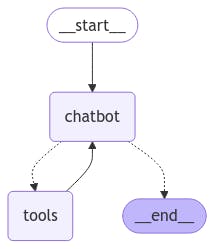
Visualizing the LangGraph
Visualization helps you understand the workflow of your AI agent and how it transitions between nodes and tools.
from IPython.display import Image, display

try:
    display(Image(graph.get_graph().draw_mermaid_png()))
except Exception:
    print("Error generating graph visualization.")
The generated diagram will showcase nodes (chatbot, tools) and the transitions between them, providing a clear overview of your AI agent’s workflow.
Improvements
At Futuresmart AI, we have observed in many projects that if you implement methods like Contextual Retrieval, reranking, etc then the performance of the Agentic RAG system will improve.
Set up Workflow Automation to handle routine tasks and use AI-driven analytics for actionable insights. Having deployed these solutions for clients, we know which workflows deliver the best ROI.
Empower agents to resolve tickets with AI-suggested replies from knowledge sources ensuring accuracy with a human-in-the-loop.
Conclusion
Congratulations! You've just built a powerful Freshdesk AI agent that combines LangGraph, RAG, and NL2SQL capabilities. Your agent can now handle everything from ticket summaries to product queries, making customer support smoother and more efficient.
But this is just the beginning. At FutureSmart AI, we've helped companies transform their customer support from reactive to proactive using these exact techniques. Our solutions have cut response times and boosted customer satisfaction. Want to see similar results for your business? Check out how we've helped companies like yours in our case studies.
We have another AI agent for HubSpot that revolutionizes CRM management by interpreting user intent, automating tasks, and integrating tools for seamless operations. Whether you need support automation or CRM enhancement, we're here to guide you through your AI journey. Reach out at contact@futuresmart.ai to learn more.
Stay tuned for more tutorials and insights as we continue to explore cutting-edge AI advancements, helping you stay ahead in the rapidly evolving tech landscape!
About the authors
🚀 I'm a Top Rated Plus NLP freelancer on Upwork with over $300K in earnings and a 100% Job Success rate. This journey began in 2022 after years of enriching experience in the field of Data Science. 📚 Starting my career in 2013 as a Software Developer focusing on backend and API development, I soon pursued my interest in Data Science by earning my M.Tech in IT from IIIT Bangalore, specializing in Data Science (2016 - 2018). 💼 Upon graduation, I carved out a path in the industry as a Data Scientist at MiQ (2018 - 2020) and later ascended to the role of Lead Data Scientist at Oracle (2020 - 2022). 🌐 Inspired by my freelancing success, I founded FutureSmart AI in September 2022. We provide custom AI solutions for clients using the latest models and techniques in NLP. 🎥 In addition, I run AI Demos, a platform aimed at educating people about the latest AI tools through engaging video demonstrations. 🧰 My technical toolbox encompasses: 🔧 Languages: Python, JavaScript, SQL. 🧪 ML Libraries: PyTorch, Transformers, LangChain. 🔍 Specialties: Semantic Search, Sentence Transformers, Vector Databases. 🖥️ Web Frameworks: FastAPI, Streamlit, Anvil. ☁️ Other: AWS, AWS RDS, MySQL. 🚀 In the fast-evolving landscape of AI, FutureSmart AI and I stand at the forefront, delivering cutting-edge, custom NLP solutions to clients across various industries.
- Learning Data Science and Sharing the journey through Hashnode.
Comments
Join the discussionNo comments yet. Be the first to comment.